Personal › Documents
Insurance, titles, warranties —
found in seconds.
Stop hunting through email threads, photo rolls, and old USB drives. Upload your household documents once, file them in a folder, and they’re searchable from any device the next time you need them at the dealership, the doctor’s office, or the insurance call. Part of Personal Plus — cloud sync & document storage for $5/mo.
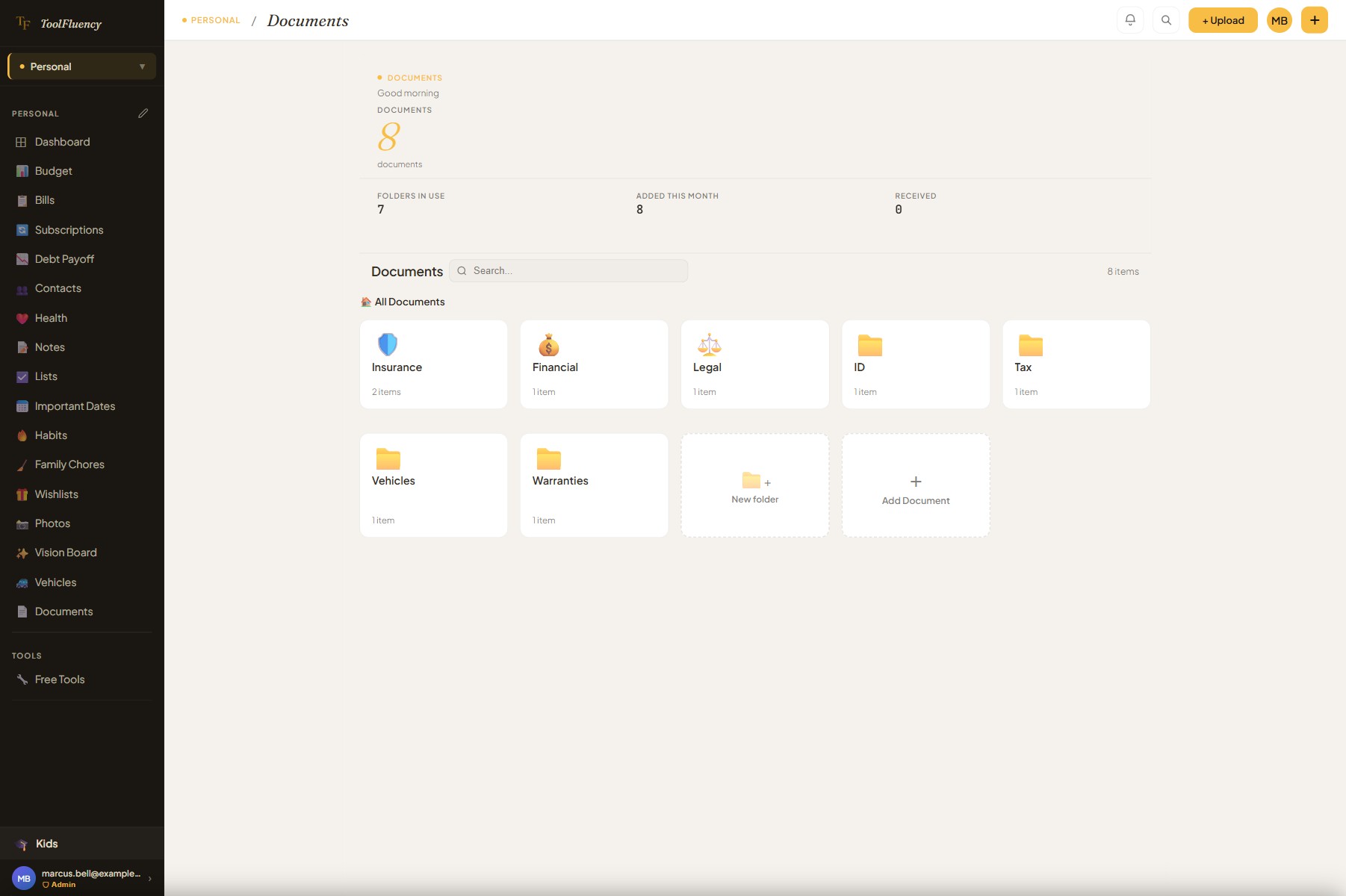 Organized in folders, searchable
- Encrypted in transit & at rest
- North American data regions
- Syncs across your devices
- Never sold or shared
How it works
1
Upload the document
Tap “+ Add Document,” drag a file onto the page, or drop it straight onto a folder tile. Add a name and an optional note while you’re there. Takes ten seconds.
2
File it in a folder
Built-in folders cover the most common categories — Insurance, Tax Returns, IDs & Passports, Medical, Financial, Legal, and more. Create sub-folders for finer organization, or make a custom top-level folder that matches your household.
3
Find it in seconds
Search by file name, folder, or note text and the right document rises to the top immediately. Or drill into the folder directly — the count on each folder tile tells you what’s inside.
What it does
Every household document job, handled
From the insurance PDF you upload today to the warranty you need three years from now — these are the features that keep your household papers organized and reachable.
Built-in folders for every household category
Nine built-in top-level folders cover the documents most households actually keep: Tax Returns, Insurance, IDs & Passports, Medical, Receipts, Financial, Legal, Education, and Other. Each folder is a drill-in view with a document count badge. Create sub-folders for finer organization — “Insurance › Auto” and “Insurance › Home” are two clicks. Or create any top-level folder you need that isn’t in the built-in set.
Search across all folders at once
Type in the search bar and the app searches every document name, folder path, and note simultaneously — across the entire vault, not just the current folder. The results appear instantly. No folder-hopping required when you just need to find the document fast.
Drag a file anywhere on the page to upload
Drag a file from your desktop and drop it on the Documents page, on a specific folder tile, or inside an open folder — it lands exactly where you dropped it. No button hunting. A visual overlay confirms the drop zone so you always know where the file will go.
Notes on every document
Add a plain-text note to any document — a policy number, renewal date, account number, or the phone number to call when you need to file a claim. The note shows on the document tile and is included in search results so a detail you typed years ago surfaces the right file instantly.
Receipts from Expenses appear here automatically
Any receipt image you attach to an expense entry on the Expenses page mirrors directly into the Receipts folder here. You don’t upload it twice — it’s the same file. The cross-feature link means your receipt archive and your expense records stay in sync without any extra work.
Drag documents and folders to reorganize
Drag a document tile onto a folder to move it in. Drag a folder onto another to nest it. Multi-select several documents and move them together. Works like a file manager — the kind of reorganization that used to mean re-uploading everything, done in a few drags.
Encrypted at rest and in transit, stored in North American regions
Your documents are stored in Google Cloud Firestore with encryption in transit and at rest. Data stays in North American regions. Your files are never analyzed, mined, or sold — they’re your household records, not an advertising dataset. Access them from any device where you’re signed in.
FAQ
Document storage questions answered
Is my data private? Who can see my documents?
Only you. Documents are stored in Google Cloud Firestore, a managed database used by thousands of apps worldwide. Data is encrypted in transit (HTTPS/TLS) and encrypted at rest, and stored in North American regions. ToolFluency staff do not access your documents. We do not analyze, mine, or sell your files. Your documents are tied to your account and not accessible by anyone else on the platform. If you cancel Personal Plus, your documents remain in your account and can be exported at any time.
Is Document Storage free, or do I need Personal Plus?
Document storage is a Personal Plus feature — it requires the $5 CAD/mo plan. The core personal finance tools (Budget, Bills, Subscriptions, Debt Payoff, Mileage Log) are free. Personal Plus adds cloud sync across all your devices, document storage, photo albums, and removes all ads. No credit card is required to start a free trial — Personal Plus access is granted the moment you sign up.
What file types can I upload?
PDF, JPG, PNG, and other common document and image formats are supported. PDFs are the most common format for insurance policies, tax returns, and legal documents; JPG and PNG work well for photos of documents like ID cards, warranty stickers, or handwritten notes. The in-app viewer opens PDFs and images directly without requiring a download or a separate app.
How does search work?
The search bar queries your document names, folder paths, and any notes you’ve added to individual documents. It searches across your entire vault — not just the folder you happen to have open — so you can find anything with a few typed characters. There is no OCR or automatic text extraction from document contents; search is limited to the metadata you set when you add or edit a document.
How do receipts from the Expenses page end up here?
When you attach a receipt image to an expense entry on the Expenses page, that file is mirrored into the Receipts folder in your personal Documents vault automatically. It’s the same file — not a copy — so your expense and your document stay in sync. This means your receipts are in two useful places at once: in the context of the expense they belong to, and in a searchable document vault alongside your other important papers.
Can I access documents from my phone at the doctor’s office or the dealership?
Yes — that’s the point. Personal Plus syncs your documents across every device where you’re signed in. Open ToolFluency in your phone’s browser, go to Documents, and your insurance card, vehicle title, or health record is right there. The app works in any iOS or Android browser without downloading anything. Add it to your home screen and it behaves like an installed app for even faster access.
Can I export or download my documents if I decide to leave?
Yes. Documents you’ve uploaded can be opened and downloaded individually from within the app at any time. Your files are not locked in. If you cancel Personal Plus, your account and document access remain intact — you can retrieve your files on your own schedule, not a deadline we impose on you.
Also in Personal
Documents is just one piece
Personal Plus gives you documents, cloud sync, and ad-free access across the whole Personal suite — budget, bills, subscriptions, debt payoff, and more, all talking to each other.
Related: Budget
See where the money actually went.
Set a monthly limit per category, log what you spent, and the app shows you the truth: how much is left, where it’s leaking, and whether this month is on track. No bank login required — just a clear picture you can act on in a minute a day.
Related: Debt Payoff
The exact month you’ll be debt-free.
Avalanche or snowball method — whichever fits you. Enter your balances, rates, and minimum payments and the planner shows your payoff date at your current pace, plus how much sooner you’ll finish if you add an extra $50 or $200 a month.
Related: Subscriptions
Find the charges you forgot you signed up for.
List every subscription in one view and see the total monthly and annual cost at a glance. Most people find $30–$80/mo of subscriptions they can cancel immediately. Knowing what you’re paying is the first step; the tracker makes the audit take ten minutes.