Personal › Subscriptions
Find the $40 a month
you forgot about.
List every subscription — streaming, cloud storage, gym, apps, meal kits. See the total monthly cost and what it adds up to in a year. Get a heads-up before anything renews. Most people find $30–$80/mo of subscriptions they’d happily cancel the moment they see them all in one place. Free to start; cloud sync & ad-free from $5/mo.
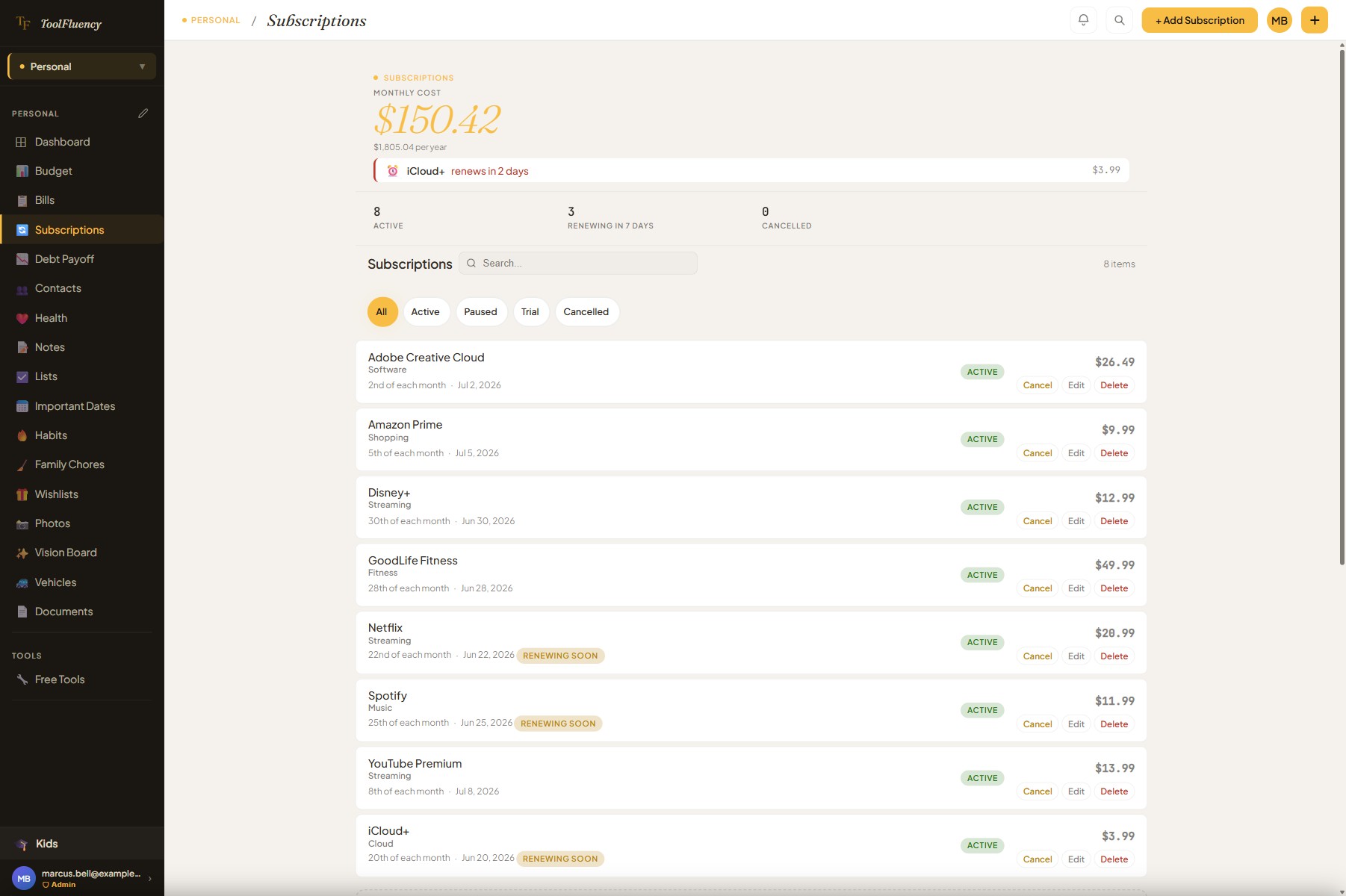 Monthly + annual cost, renewal alerts
- No bank connection — you add them
- Monthly total + annualized in one view
- Renewal alerts before you’re charged
- No credit card to start
How it works
1
Add your subscriptions
Enter the service name, amount, billing cycle (monthly, yearly, weekly…), and next renewal date. Takes about ten minutes to log a year’s worth of charges. No bank login — you control exactly what goes in.
2
See the monthly and yearly total
The tracker converts everything — a $99/year plan, a $14.99/month plan, a $9.99/week plan — into a single monthly cost and what it adds up to per year. The number at the top is the real cost of your subscription stack.
3
Cancel what you don’t use
Seeing everything on one screen makes the decision obvious. Mark subscriptions as paused or cancelled — they drop to the bottom so the total stays accurate. Set a status of “trial” for things you’re testing so you remember to review them before they convert to paid.
What it does
Every subscription, accounted for
From the trial you signed up for last month to the annual plan that silently renews — these are the flows that put you back in control of your subscription spending.
Monthly cost and annualized total — at the top
The hero shows your active monthly spend and exactly what that adds up to per year. Yearly plans, monthly plans, and any other billing cycle are all converted to a monthly rate so the number is apples-to-apples. Cancel three services and watch the totals update in real time. The annualized number is the one that usually surprises people — $38/mo sounds manageable until you see it’s $456 a year.
Renewal alerts — “renewing in 2 days”
The app flags subscriptions renewing within 7 days right at the top of the list with a “Renewing Soon” badge. The countdown shows the specific service and how many days away. Urgent renewals (3 days or less) show in red so you can decide whether to cancel before the charge lands.
Four statuses: active, paused, trial, cancelled
Active subscriptions count toward your monthly total. Paused and cancelled subscriptions sit below the list — still tracked, not counted. Trial flags things you’re testing so you remember to review them before the charge kicks in. Filter the list by status to see just your trials or just your cancelled history.
Upcoming renewals panel — next 30 days
Below the list, a renewal calendar shows every charge hitting in the next 30 days in date order. Each chip shows the service name, renewal date, and amount. Urgent renewals are highlighted in amber or red so you can triage at a glance without opening any individual subscription.
Search and category filter chips
Type a service name to find it instantly. Filter chips at the top let you view Active, Paused, Trial, or Cancelled subscriptions separately. Categories — Entertainment, Software, Music, Cloud, Health, Education — keep related subscriptions grouped so you can audit one type at a time.
Spending by category — donut chart
A donut chart shows your monthly subscription spend broken down by category. It’s often the first time people see that they have three separate cloud storage subscriptions or four streaming services. The visual makes the cut decision easy — the bloated category announces itself.
Edit, cancel, or reactivate any subscription
Tap any row to edit the details — name, amount, schedule, payment method, category, notes. Tap Cancel on an active subscription to mark it cancelled (with today’s date recorded). Cancelled subscriptions can be reactivated at any time — useful for seasonal services or things you cancel and re-subscribe to periodically.
FAQ
Subscription tracker questions answered
Does it automatically find or import my subscriptions?
No — and that’s intentional. Automatic subscription detection requires connecting to your bank or email account, which we don’t do. You add subscriptions manually, one by one. It takes about ten minutes to log a year’s worth of recurring charges, and the upside is your bank login and inbox stay private. No aggregator, no credential handoff. The manual entry is also more accurate — auto-detection from bank statements often misses annual plans or trials that haven’t charged yet.
Is it free, or do I need Personal Plus?
The subscription tracker is free. You can add subscriptions, see the monthly and annual totals, filter by status, and get renewal alerts — all at no cost. Personal Plus ($5 CAD/mo) adds cloud sync so your subscription list follows you across your phone, tablet, and laptop, removes ads, and unlocks document storage and photo albums. The tracker itself is the same in both tiers.
How do renewal alerts work?
The app computes when each subscription is next due based on the billing schedule you entered. Anything renewing within 7 days gets a “Renewing Soon” badge in the list. The hero section also shows a countdown to the single soonest renewal — “Netflix renews in 2 days — $15.99” — highlighted in red if it’s within 3 days and amber if it’s 4–7 days out. There are no push notifications; the alerts are visible every time you open the page.
How does it calculate the monthly total for annual plans?
Annual plans (like a $99/year cloud storage subscription) are divided by 12 and included in your monthly total — so $99/year appears as $8.25/month in the summary. The same conversion applies to any billing cycle: weekly, bi-weekly, or custom schedules. The monthly total is the true all-in cost of your subscriptions so the comparison is always apples-to-apples.
Can I track trials so I don’t forget to cancel?
Yes. There’s a “Trial” status specifically for this. Set a subscription to Trial, enter the renewal date, and it will appear with a “Renewing Soon” alert before the trial converts to paid. Trials count toward your active monthly total (since they may charge after conversion), and they show up in the 30-day renewal panel so they don’t sneak past you.
What happens when I cancel a subscription in the app?
Marking a subscription as Cancelled in the app is just a status change in your tracker — it records today as the cancellation date, removes it from the monthly total, and moves it to the Cancelled section at the bottom of the list. It doesn’t cancel anything with the actual service — you still need to do that through the service’s website or app. The tracker is a record-keeper, not a cancellation tool. You can reactivate a cancelled subscription in the tracker any time if you re-subscribe.
Does it work for household subscriptions shared with a partner?
Yes. If you and a partner are both on a Personal Plus account in a shared household, subscriptions can be marked as “joint” so both of you can see and edit them. Private subscriptions stay visible only to the person who added them. If you’re tracking alone, all subscriptions are private by default — no household setup needed.
Also in Personal
Subscriptions are just the start
The subscription tracker handles the recurring charges. These sibling tools cover the rest of your personal finances — month-to-month spending, fixed bills, and the debt you’re working to clear.
Related: Budget
See where the money actually went.
Set a monthly limit per category, log what you spent, and the app shows you the truth: how much is left, where it’s leaking, and whether this month is on track. No bank login to hand over — just a clear picture you can act on in a minute a day.
Related: Debt Payoff
The exact month you’ll be debt-free.
Avalanche or snowball — your call. Enter your balances, rates, and minimum payments and the planner shows you the payoff date at your current pace, plus how much sooner you’ll finish if you add an extra $50 or $200 a month. Honest math, no upsell.
Related: Documents
The “where did I save the…” panic stops.
Insurance policies, vehicle titles, warranty PDFs, lease agreements. With Personal Plus you get encrypted document storage — searchable, private, and on your phone when you need it at the dealership or the doctor’s office.