Wishlists and Secret Santa

Wishlists and Secret Santa,
in one place.

Make a list with pictures, send one link to the family chat, and draw names for the gift exchange. Nobody needs an account to see your list, and nobody doubles up on a gift.
Wishlists
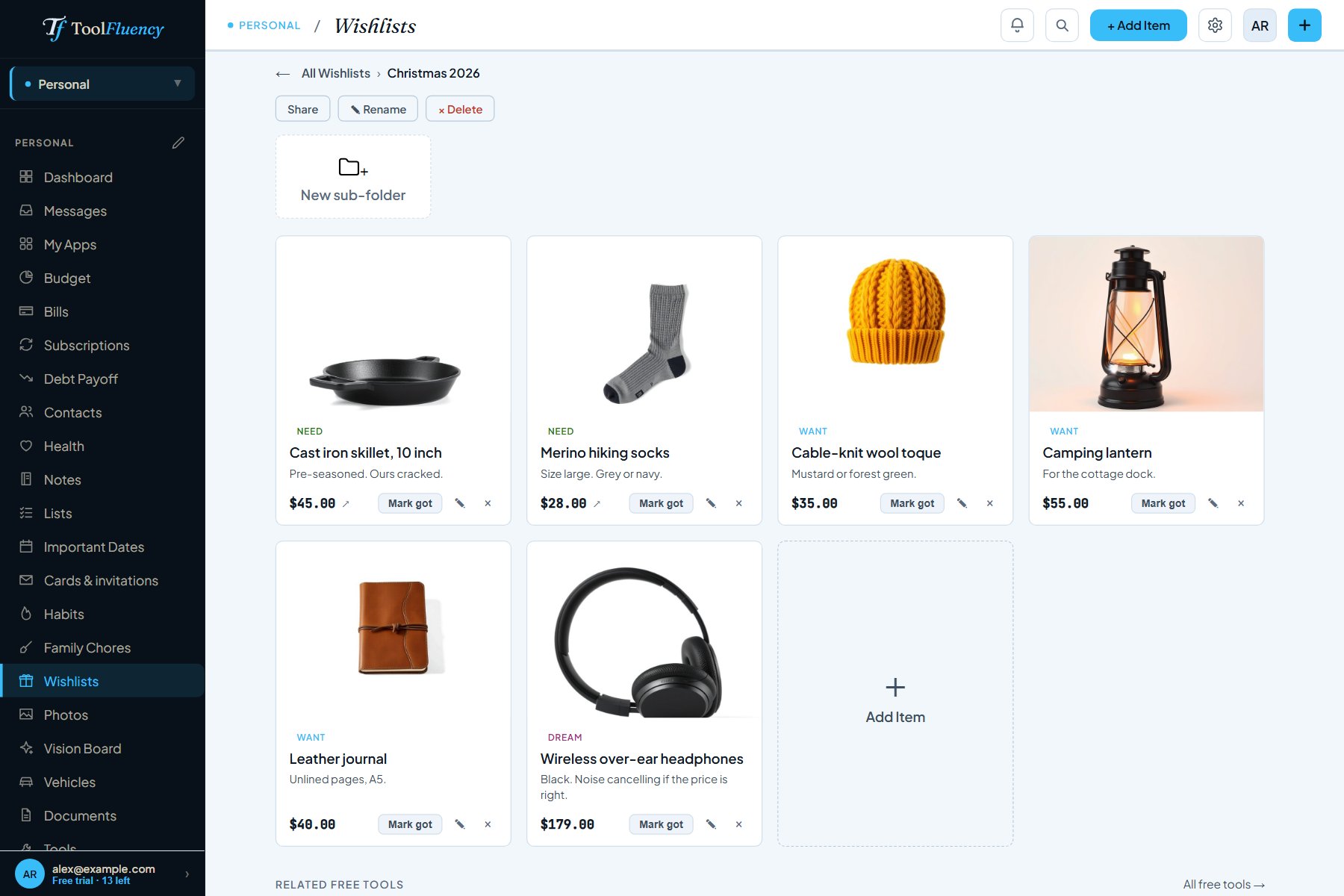
A Christmas 2026 wishlist in ToolFluency with six wishes, each with a photo, a Need, Want or Dream tag, a note and a price
  • Free to start
  • No account needed to see a shared list
  • One link for any group chat
  • Claims stay hidden from the person

Right-click a photo in any shop, choose Copy image, and paste it onto your wish. Or upload one from your phone. Sort wishes into Need, Want and Dream, add a note about size or colour, and file lists in folders.

A Secret Santa in four steps

One person starts the exchange. Everyone else joins from the link, adds a few wishes, and waits for the draw.

1
Start the exchange
Name it, pick the day, invite people.
Paste the invite link or code into the group chat, email it, or send it to someone in your Contacts. Everyone joins with a free account. For someone who won't sign up, like Grandma, add her by name and look after her list yourself.
2
Everyone adds wishes
Photos, links, sizes and a please-no list.
Up to 12 photos and 10 links on each wish, or copy wishes over from your own lists. Vote on a spending limit, or let the organizer set one.
3
Draw names
Each person taps to see who they are buying for.
The draw runs on ToolFluency's server, so the organizer can't peek. Keep couples apart, stop two people from drawing each other, or send the gifts around in one big circle. Everyone gets a notification when names are drawn.
4
Shop
Claim a gift so nobody doubles up.
Tap I'll get this on a wish and everyone else in the group sees it's taken. The person it's for never does. Unsure about a size? Ask them anonymously.

Real screens, not promises

toolfluency.com/w/...
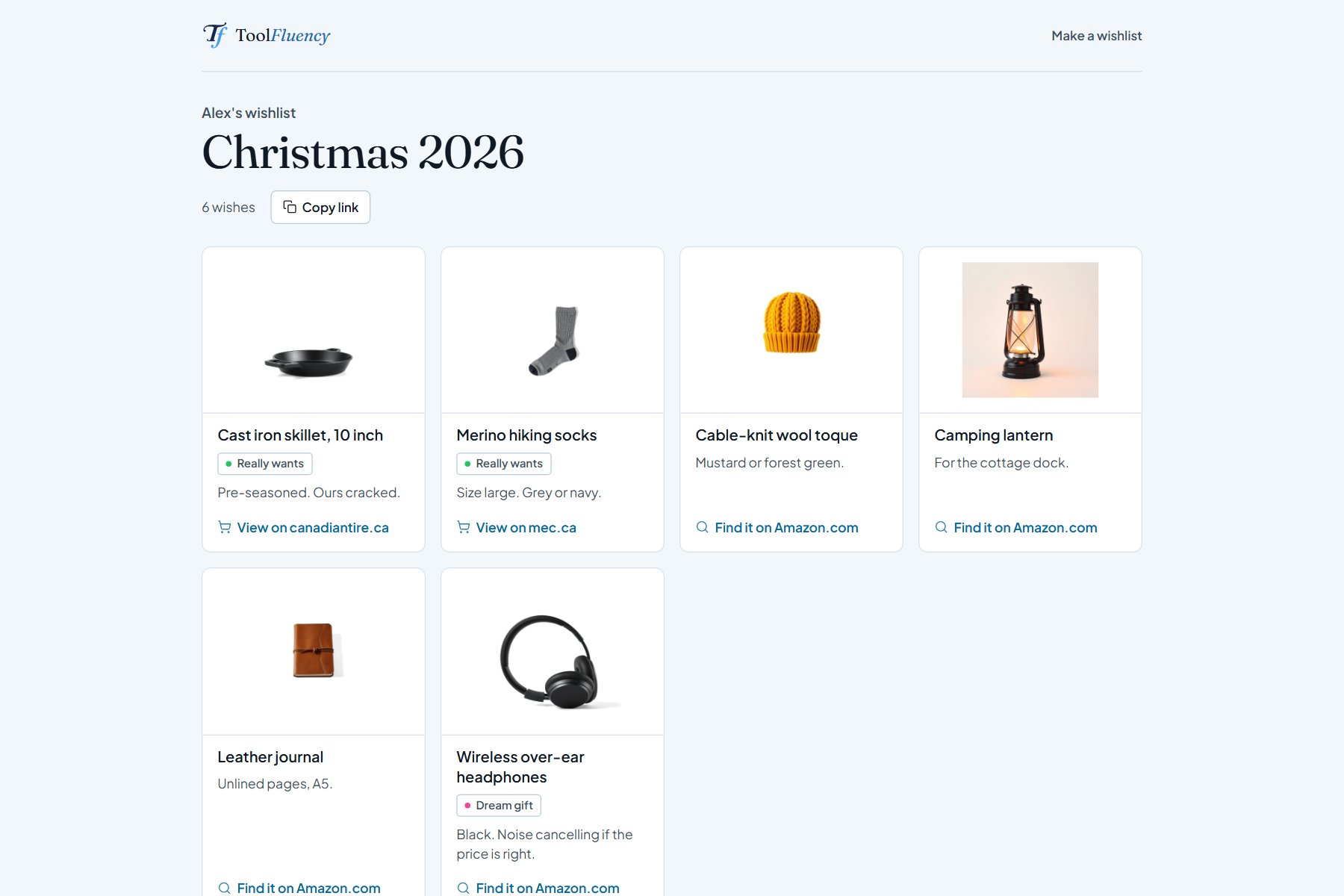
The shared page for Alex's Christmas 2026 wishlist as a visitor sees it: six wishes with photos and notes, a Copy link button and shop links, with no sign-in What the family sees, no sign-in
Share with one link

One link. No account needed to look.

Turn on a share link and paste it into Messenger, WhatsApp, a text or an email. Whoever opens it sees your wishes, notes, links and pictures without signing up. Turn the link off and it stops working straight away.

  • Wishes you mark as got drop off the shared page
  • Who is getting what never shows on it
  • Or invite people by email, or show the list to people who save you in Contacts
Gift exchanges
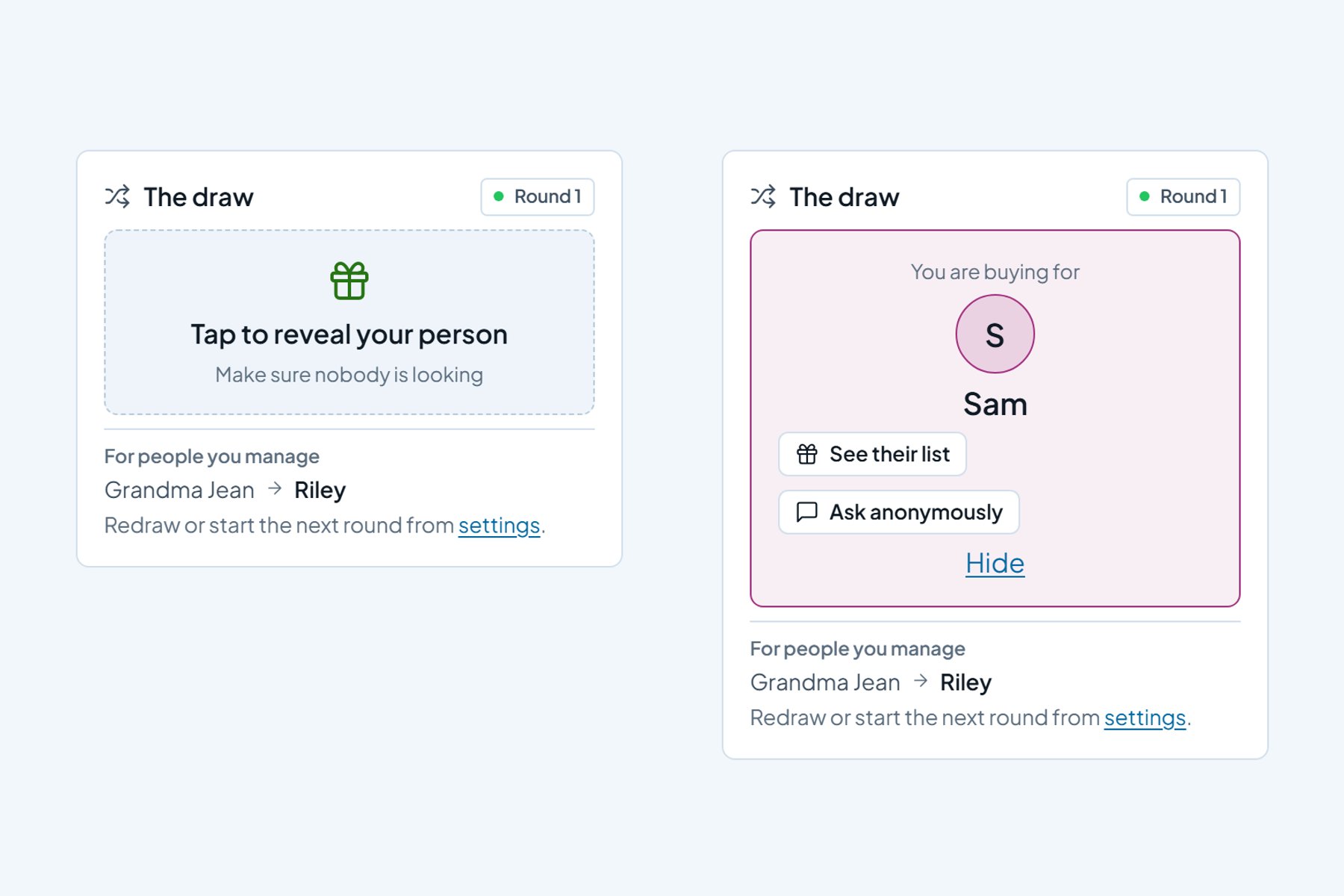
The draw card before and after the tap: first Tap to reveal your person, then You are buying for Sam, with buttons to see Sam's list and ask anonymously Before and after the tap
The draw

Tap to see your person, when nobody is looking.

Once names are drawn, your person waits on a card you tap to open. The pairs are made on ToolFluency's server and each person can read only their own, so not even the organizer knows who has whom.

  • Keep couples or housemates apart
  • No swapping pairs: if Sam draws Alex, Alex won't draw Sam
  • Redraw, or start a new round that steers clear of last round's pairs
Gift exchanges
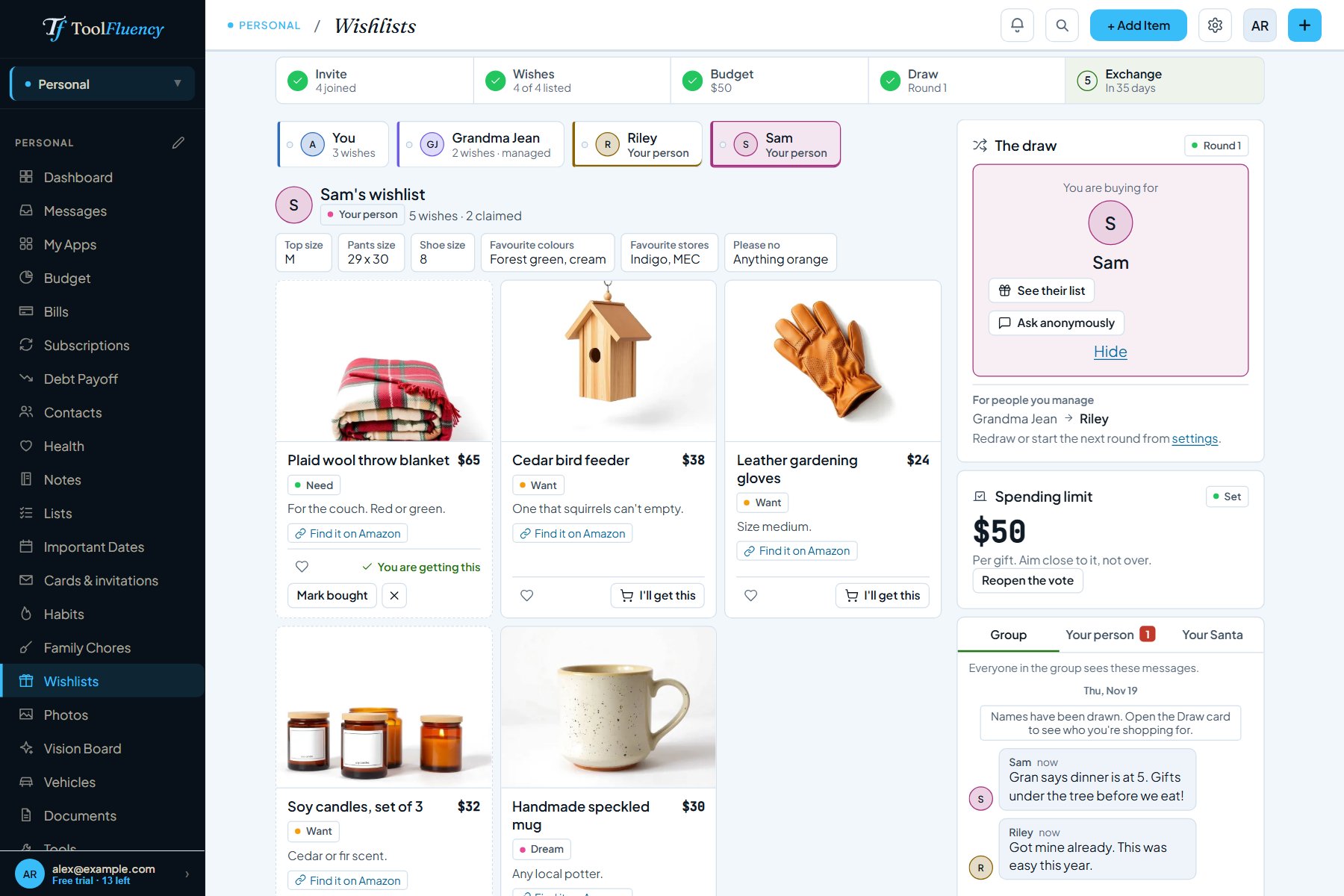
Sam's wishlist in the Reid family Christmas exchange: Sam's sizes and favourite colours, wishes with photos, one marked You are getting this and others with an I'll get this button, beside the draw card and a $50 spending limit Sam never sees these claims
Claims

I'll get this. And nobody doubles up.

On anyone's list, tap I'll get this. Everyone else in the group sees it's claimed, so two people don't buy the same blanket. The person the list belongs to never sees the claims, and their own list tells them so.

  • Mark it bought once it's done
  • Sizes, favourite colours, favourite stores and a please-no list on every profile
  • The group's spending limit, voted on or set by the organizer
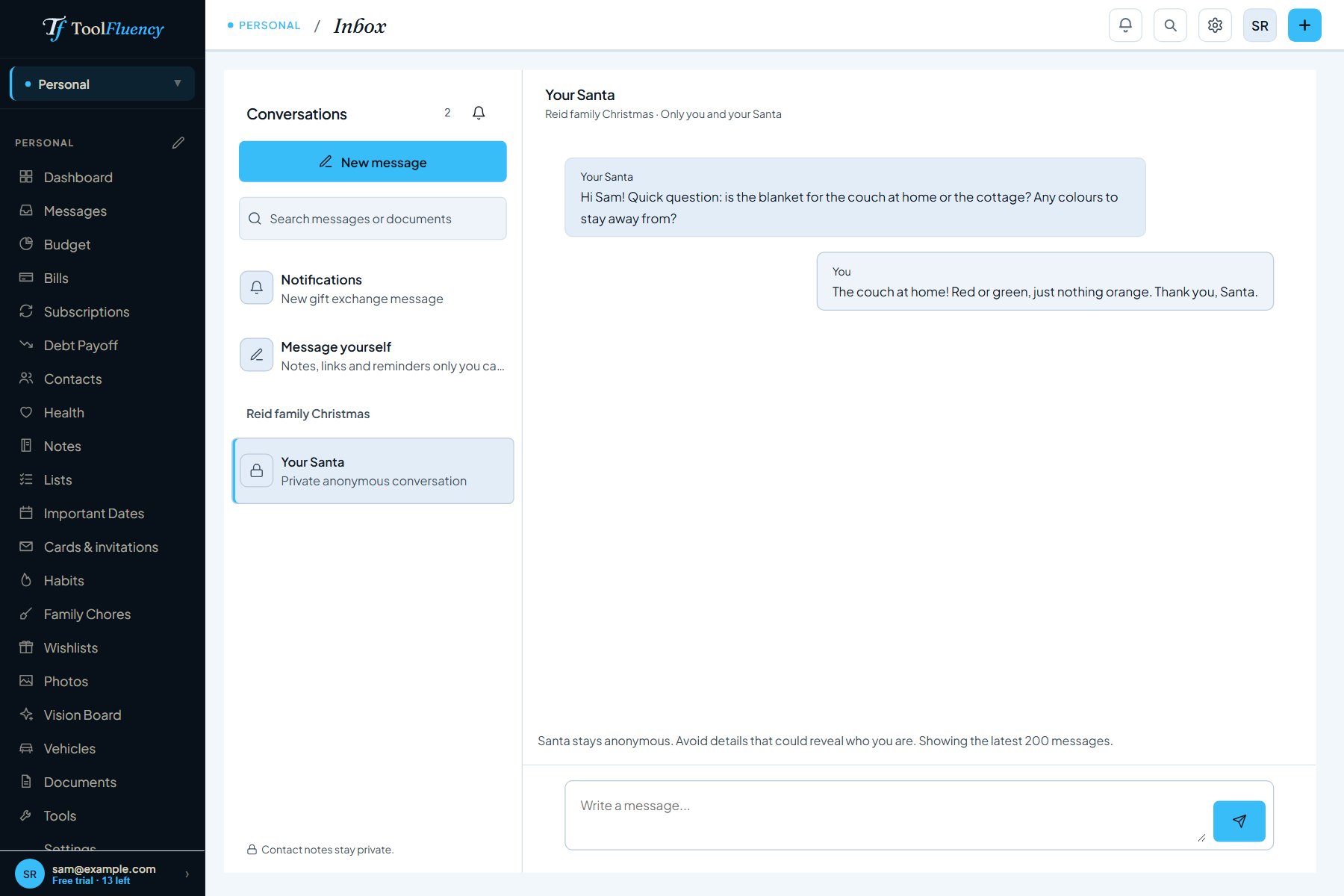
Messages
Sam's Messages page showing a private conversation with Your Santa: a question about the blanket and Sam's reply, with a note that Santa stays anonymous Sam sees Your Santa, never a name
Ask anonymously

Ask about sizes without giving it away.

From the draw card, tap Ask anonymously. Your person gets your question from Your Santa in their messages and can answer back. Your name is never attached to the conversation.

  • They can drop hints back to you
  • A separate group chat for the date, the place and the theme
  • Nudge anyone who hasn't added wishes yet
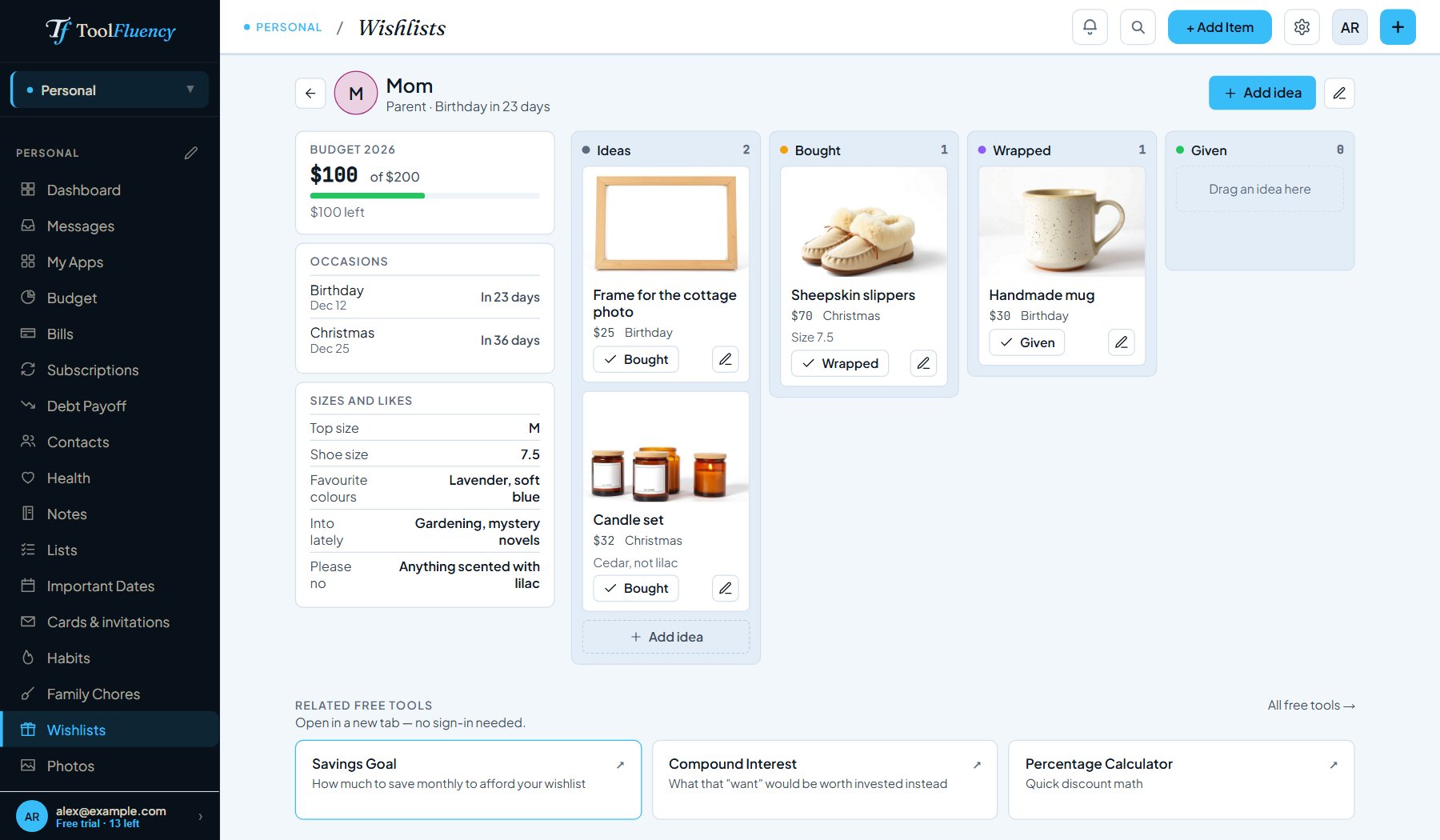
Wishlists › People
Gift ideas for Mom: a $200 yearly budget with $100 spent, her birthday in 23 days and Christmas in 36, her sizes and likes, and gift ideas in Ideas, Bought, Wrapped and Given columns A budget and a countdown for each person
Gift ideas

Everyone you shop for, in one place.

No exchange needed. Keep sizes, birthdays and a yearly gift budget for each person, and move each idea from Ideas to Bought, Wrapped and Given. You see what you've spent and whose birthday is next.

  • Birthdays and other dates with countdowns
  • Things to avoid, right next to the sizes
  • See the lists your contacts made public to you

Why not Elfster or the group chat?

If you already use a gift exchange app you like, keep it. Here is what you get on ToolFluency, and why a chat thread on its own falls short.

vs. the group chat
The list doesn't scroll away.
Wishes posted in a chat get buried under photos and plans by December. A wishlist is one link that stays put, with the picture, the size and the shop in one place, so people can find it the night they shop.
vs. a shared doc
Surprises stay surprises.
In a shared spreadsheet or note, everyone sees who is buying what, including the person it's for. On ToolFluency, claims are hidden from them, and the draw is made on the server, so nobody can peek.
vs. a separate app
One account for the lists, the draw and the ideas.
Your own wishlists, every exchange you're in, and gift ideas for the people you shop for sit in one free account, next to your budget and bills if you use those. One link works in Messenger, WhatsApp or a text.
How it's paid for
Free, and plain about why.
Amazon links on lists you share carry ToolFluency's affiliate tag when other people view them. If someone buys through one, the site earns a small commission at no extra cost to them. That is what keeps wishlists free.

Questions answered

Is it free?
Yes. A free account can keep as many wishlists and folders as you like, with as many wishes on each. Share links, gift exchanges and the name draw, and gift ideas for the people you shop for have no plan limit either. Personal Plus ($5 a month, in CAD or USD) is for the rest of the personal suite: no limits on budget, bills and notes, plus documents, photos and household sharing. See plans.
Do people need an account to see my list?
No. Turn on a share link and anyone who opens it sees your wishes, notes, links and pictures without signing up. You confirm your own email address once before your first share link. Joining a gift exchange is different: to draw names, claim gifts and chat, each person needs a free ToolFluency account. For someone who won't sign up, like a grandparent, the organizer can add them by name and look after their list.
Can I share it in Messenger, WhatsApp or a text?
Yes. The share link is an ordinary web link, so it works anywhere you can paste one: Messenger, WhatsApp, iMessage, a text or an email. Gift exchange invites come with a link and a short code, and on a phone you can send them through your phone's share menu.
How does the draw keep it secret?
Names are drawn on ToolFluency's server, not in anyone's browser, and each person can read only their own result. The organizer does not see the pairs either, except for people they look after who have no account, and unless the group picks Everyone sees. Claims are kept the same way: the person a wishlist belongs to never sees who claimed what, and when you ask them a question anonymously, your name is never attached to the conversation.
What about Amazon links?
When someone else views your list, Amazon.ca and Amazon.com links on it carry ToolFluency's Amazon affiliate tag, and a wish with no link gets a Find it on Amazon search link. If they buy through one, ToolFluency earns a small commission. That supports the site and costs the buyer nothing extra. Your own view shows your links exactly as you pasted them, links to other shops are never changed, and a link that already carries someone's tag is left alone.
How do I add a picture to a wish?
Right-click a photo in any online shop, choose Copy image, then paste it into the picture box on your wish. You can also paste the picture's web address, drag a picture in, or upload one from your phone or computer. Wishes in a gift exchange take up to 12 photos each.
Is it only for Christmas?
No. A gift exchange can be for Christmas, the holidays, a birthday, an office party or anything else, with its own date and spending limit. Wishlists and gift ideas work all year, and gift ideas count down to each person's birthday.

Make your list tonight. Send the link tomorrow.

Free to start, with no credit card. Add a few wishes, turn on the share link, and drop it in the family chat. When it's time to draw names, start an exchange from the same page.

Make your wishlist, free
See plans Make your wishlist