Personal › Debt Payoff
The exact month you’re
debt-free. In writing.
Enter your balances, interest rates, and minimum payments. Pick snowball or avalanche. The planner tells you the payoff date, the total interest cost, and what happens if you add an extra $50 or $200 a month. Real amortization math — not a rough estimate. No bank connection, no spreadsheet, no credit card to start.
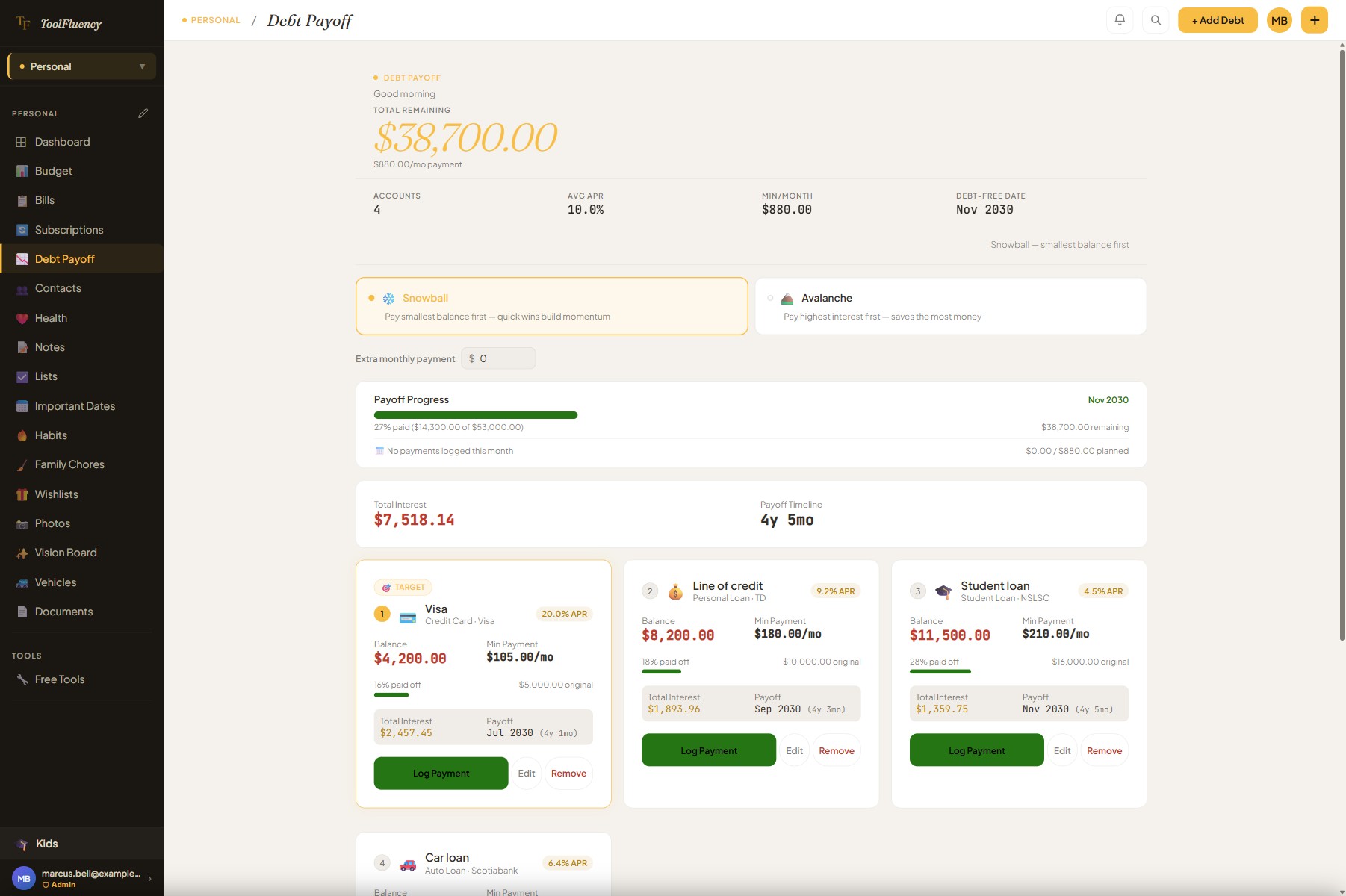 Snowball or avalanche — real payoff date
- No bank connection — by design
- Real amortization math per debt
- Extra-payment what-if built in
- No credit card to start
How it works
1
Add your debts
Enter each account: name, type (credit card, student loan, auto loan, mortgage, medical…), current balance, original balance, APR, and minimum monthly payment. Takes about two minutes for a typical debt load.
2
Pick a strategy
Snowball pays the smallest balance first — quick wins keep you motivated. Avalanche attacks the highest interest rate first — it saves the most money overall. Switch between them any time to see how the math changes.
3
See the debt-free date
The planner shows your payoff month, total interest across all debts, and a per-debt timeline. Dial in an extra monthly payment to see exactly how many months — and how much interest — you save.
What it does
Every piece of the payoff picture, calculated
From the strategy you pick to the month you make the last payment — these are the features that turn a pile of balances into an actual plan.
Snowball vs. Avalanche — switch any time
Two strategies, one toggle. Snowball orders your debts smallest balance first — each payoff frees up cash that rolls into the next one, building momentum quickly. Avalanche orders by highest APR first — you pay less total interest over the life of the plan. Neither is universally better: the planner shows you both payoff dates and interest totals side-by-side so you can make the call yourself. Freed-up minimum payments from paid-off debts automatically cascade into the next target debt — that’s the real power of either strategy.
Extra monthly payment what-if
Type in any extra monthly amount — $50, $200, whatever you can find in the budget — and the planner recalculates immediately: new payoff date, months saved, and total interest saved. A live savings hint shows you the exact number of months you cut off at a glance.
Debt-free date and total interest in the hero
The top of the page always shows: total remaining balance, average APR across all accounts, total minimum payment per month, and your projected debt-free month (e.g. “Sep 2028”). The summary card below shows the payoff timeline (e.g. “4y 5mo”) and total interest you’ll pay — the number most people have never actually calculated.
Per-debt cards with APR, progress, and payoff month
Every debt gets its own card sorted by strategy order: the “Target” debt is highlighted in primary. Each card shows current balance, APR badge, minimum payment, percentage paid off (with a progress bar), total interest for that debt, and its individual payoff month within the plan. You can see at a glance which account the plan attacks next.
Overall payoff progress bar
A single progress bar spans the full plan: how much of your combined original balance you’ve paid off, the percentage complete, and the remaining balance. If you’ve logged payments this month, it also shows an on-track / behind-plan indicator comparing what you’ve paid against the plan’s prescribed amount.
Log real payments against each debt
Tap “Log Payment” on any debt card to record what you actually paid: amount, date, and an optional note. The planner shows the interest vs. principal split for that payment and recalculates the new balance immediately. Logged payments reduce the live balance so the progress bar and plan stay accurate month over month.
Manual entry — your bank login stays with your bank
ToolFluency doesn’t connect to your bank or your credit card accounts, and that’s a deliberate choice. Bank-connecting apps ask you to hand credentials to a third-party aggregator. We’d rather not ask you to do that for a debt planner. You type in the numbers yourself — it takes two minutes — and your financial data never leaves your control.
FAQ
Debt payoff questions answered
What’s the difference between snowball and avalanche?
Both strategies pay minimums on all debts each month, then throw any extra money at one target debt until it’s gone. The difference is which debt gets targeted first. Snowball orders by smallest balance — you wipe out the first debt quickly, which frees up its minimum payment to roll into the next one. Momentum and motivation are the argument here. Avalanche orders by highest APR — you attack the debt costing you the most each month, which minimizes total interest paid over the life of the plan. The math always favors avalanche, but the psychology often favors snowball. The planner lets you switch between them instantly so you can see the real difference in months and dollars for your specific debts.
Does it connect to my bank or pull my balances automatically?
No — and that’s intentional. Connecting a debt planner to your accounts requires routing your credentials through a third-party aggregator (Plaid, Flinks, Yodlee). That’s a meaningful trust transaction, especially for sensitive accounts like mortgages and credit cards. ToolFluency Debt Payoff is manual: you enter your balances, rates, and payments yourself. You log payments as you make them and your numbers stay accurate. No aggregator holds a copy of your account data.
Is the debt planner free, or do I need Personal Plus?
The core planner — adding debts, strategy toggle, payoff date, total interest, extra-payment what-if, per-debt cards, and payment logging — is free. Create a free account and your debts and payments save across sessions on that device. Personal Plus ($5 CAD/mo) adds cloud sync so your plan follows you across your phone, tablet, and laptop, plus removes ads. The planner itself works the same in both tiers.
How accurate is the payoff date?
The planner uses real amortization math: each month it calculates interest on the current balance, applies minimum payments, then applies your strategy’s target payment and any extra you’ve entered. The result is an exact month count, not an estimate. The accuracy depends on the numbers you enter — if your APR changes (variable-rate credit card) or you make irregular payments, the date shifts. Log payments as you make them and the balance stays current. The what-if for extra monthly payments is calculated the same way, so “this saves you 14 months” is the real number for your exact situation.
What debt types can I add?
Credit card, auto loan, student loan, mortgage, personal loan, medical debt, and other. Each type gets its own icon on the card. The type is cosmetic — the payoff math is the same regardless of type — but it helps you see your debt picture at a glance when you have five or six accounts.
What does the extra monthly payment actually do?
The extra payment is applied each month to the current target debt (whichever is first in strategy order). When that debt is paid off, the extra payment — plus the freed-up minimum payment from that debt — flows to the next target automatically. This is the “debt snowball/avalanche cascade” that makes these strategies so effective. The planner shows you the number of months saved and the interest saved compared to paying minimums only, so you can see exactly what that extra $100/mo buys you.
Can I log actual payments so the plan stays current?
Yes. Each debt card has a “Log Payment” button. Enter the amount and date, and the planner shows you the interest vs. principal split for that payment in real time before you save. The balance updates immediately after you log it, which keeps the progress bar and the payoff date accurate. If you’ve logged payments this month, the progress bar also shows whether you’re on track, ahead of plan, or behind the prescribed payment amount.
Also in Personal
Debt payoff is one piece of the picture
Paying down debt is the most powerful thing most people can do for their financial health — but it works better alongside a budget that finds the extra payment, and a subscription audit that frees up cash you forgot you were spending.
Related: Budget
Find the extra $100 you’re not paying down debt with.
Category-by-category spending progress bars. Set a limit per category, log what you spend, and the problem categories announce themselves in amber and red. Most people find at least one category that funds an extra debt payment immediately once they see it.
Related: Subscriptions
Find the charges you forgot you signed up for.
List every subscription — streaming, cloud storage, gym, apps, meal kits. See the total monthly and annual cost in one view. Most people find $30–$80/mo of subscriptions they can cancel. That’s a meaningful extra debt payment without touching anything else.
Related: Documents
Keep your loan agreements where you can find them.
Loan documents, mortgage agreements, and insurance policies stored in one private, searchable place. With Personal Plus you get encrypted document storage — on your phone when you need it at the bank, the dealership, or the phone call with your lender.